
What is a Customer Portal?
The Customer Portal account is a free access Cargosnap account that simply has one page with Incoming Shared files.
It provides easy access for third-parties that often receive files from a company (even multiple companies) that uses the Cargosnap mobile app in the operations.
With the regular share-emails going on and piling up, things can get a bit inconvenient and the Customer Portal is a more friendly experience for keeping the overview.
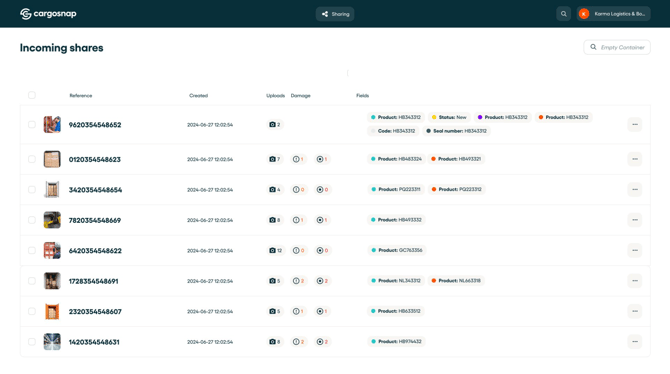
This account can empower them greatly as:
-
They can freely search files based on 'Reference', 'Date' and 'From which company'.
-
They can filter and sort in the file itself (e.g. 'only show forms')
-
The snaps and videos stay in the same high-quality
-
This does not take any storage in their email inbox or PC
-
New shares automatically appear in their Cargosnap account
-
After being able to get all data in one place, they can now disable the notification for emails.
How to create a Customer Portal account
It is very easy to let your customer create a Customer Portal account.
💡Note: The Customer Portal account is fully owned by the party that is receiving the files (your customer). You decide what to share, and they get instant access to your inspection results. Your content. Their space.
Curious whether they've set on up yet? It could be that they already created a Customer Portal after receiving a file from you. It's worth asking them.
Step 1: Share a file with the customer
When you share a file with your customer, it looks like this in their email. You can guide your stakeholder to click the "Open report" button; to view the shared file.

Step 2: The customer opens the file and registers with a customer portal
Once they have opened their file, they will see the following pop up where they can register (for free). This will result in creating a Customer Portal.
Note: The pop up to create a customer portal will only show when the recipient uses an email domain that is not recognized by Cargosnap - meaning it was not used before to create any account.
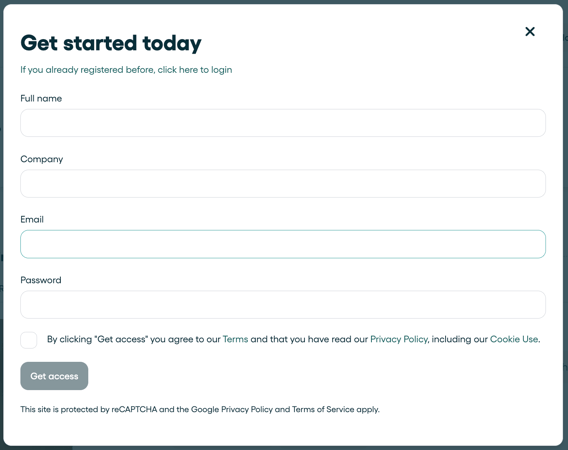
Step 3: The customer activates the Customer Portal account
After clicking on "Get access" all they need to do is activate it through the link received by email—and that’s it! Everything is now much simpler and more efficient for both of you.
The above steps is the only way to create a Customer Portal account.
⚠️ Attention! There is a difference between a "Customer Portal" account for third parties and the "Viewer" user role in your own account.
- A "customer portal" account is created exclusively for customers (external stakeholders), allowing for smarter, more organized, and efficient file sharing. With it, they can only view the files you chose to share.
- The "viewer" role is a type of profile you can add to your own account so internal team members can access files and forms according to their permissions (see this article). They will have access to all your files and not only the files that you shared. ⚠️