The mobile app keeps working
Your team can keep using the mobile app to run inspections. Everything captured is safely stored on the device and uploaded automatically when the platform is back online. Only features that need a live connection to our servers are paused (such as Field Validation and Issue Management).
Platform and API not available
While the platform is unavailable:
- You can’t sign in to the Cargosnap platform or view, search or export files. In case you are able to sign during an outage, you will see a banner with the status.
- The Cargosnap API doesn’t respond, so integrations with your own systems (such as a WMS, TMS or ERP) can’t send or receive data. Once the platform is back, your integrations can pick up where they left off. If your integration doesn’t retry failed requests automatically, you may need to resend them.
If a device was signed out
In some cases, devices can be signed out of the app while the platform is unavailable. Once the platform is back, you can sign in again using one of the usual methods:
- QR code
- Activation email
- SMS
More information in this article 'How to re-register a device'.
If a device is still signed out and you can’t sign it in again, please contact our support team and we’ll help you get it running.
Staying informed
During an outage, we’ll keep you updated on the progress and let you know as soon as everything is working again. This means the banner simply disappears on the platform or you will receive an email with the online status.
Afterwards, we share a summary of what happened and what it meant for you.
If you have questions or notice anything that doesn’t look right after the platform is back, such as missing uploads, please contact our support team.
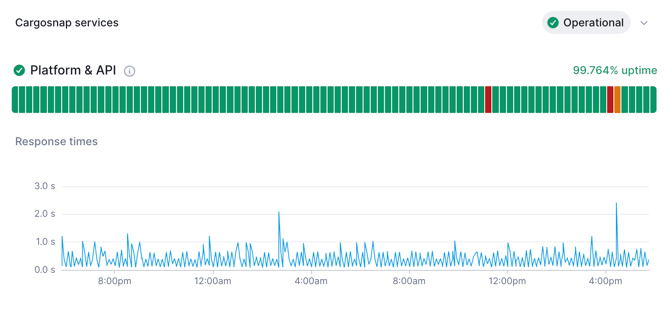
Status Cargosnap
You can always check the status of Cargosnap on this page:
https://status.cargosnap.com/
Once we are back online, you will see a green icon and status bar: