
When do you use the validation?
Has it happened to you that you were working on a couple of shipments and ended up loading a product into the wrong truck? Or you assumed a certain container was sealed with a seal with a certain id, only to find out later (detained container) that someone swapped seals? Costly!
If you know what container, seal, barcode, or any field should be handled in a file, Cargonap allows you to 'validate' that value.
Example case: container code validation
Imagine that you have a container outbound process that consists of these 3 workflows:
-
Document checks
-
Container inspection
-
Container loading
Now, imagine that in step 2 and 3 you want to "double-check" that in fact the same container from the provided documents is being used.
In Cargosnap, you may opt for 3 separate workflows to accomplish this (or just one, all on the specific conditions you have). So lets create these 3 workflows:
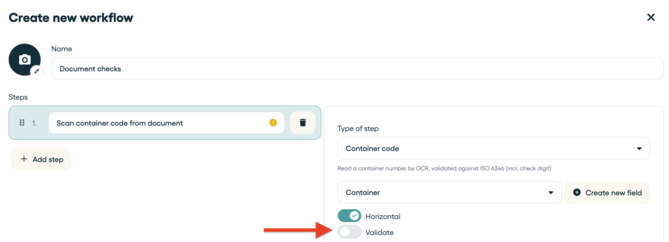
Workflow 1: Document checks
- Scan container code from document (validation disabled)
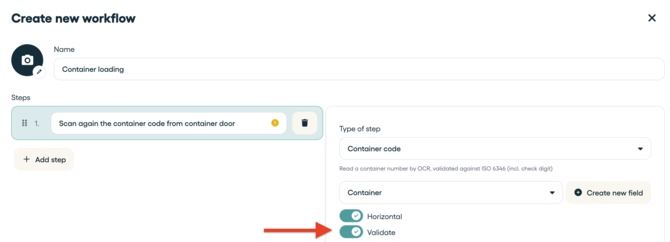
Workflow 2: Container inspection
- Scan container code from container door (validation enabled)
Workflow 3: Container loading
- Scan again the container code from container door (validation enabled)
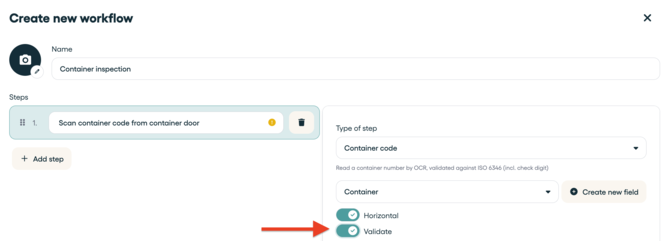
You just turned on a process whereby you validate in workflow 2 and 3 that the same code as collected in Workflow 1 is in fact used!
Use validation in just 1 workflow
You can also run this validation process in just 1 workflow by e.g. scanning the code from the document in step 1 (validation disabled) and then another time from the container door in step 2 (validation enabled).
Warning error:
So, in the case the container code used is not the same as in workflow 1, a warning will be shown, and the operator of the Cargosnap app will not be able to proceed, until the error is corrected. This may avoid costly mistakes!
.jpg?width=364&height=656&name=IMG_2715%20(1).jpg)