
⚠️ IMPORTANT: The "Send Diagnostics" button is only available when DEBUG mode has been enabled on your device by the Cargosnap technical team.
DEBUG mode is a special troubleshooting feature that unlocks extra tools in the app. It helps our technical team quickly identify and resolve complex issues, so if you've been asked to run diagnosis on your device, it's because we're working to make sure you have the best performance possible! Read more about it here.
What does debug mode do?
Enabling debug mode increases logging to our logging server and unlocks additional features in the device's debug menu. Users will gain access to actions such as:
- Upload database
- Upload images
- View local storage list
- Send device diagnostics
Sending Diagnostic Data
Here's a step-by-step on how to send diagnostics from your app:
- Click the ☰ on the top left of your app screen
- Click on your Counters box
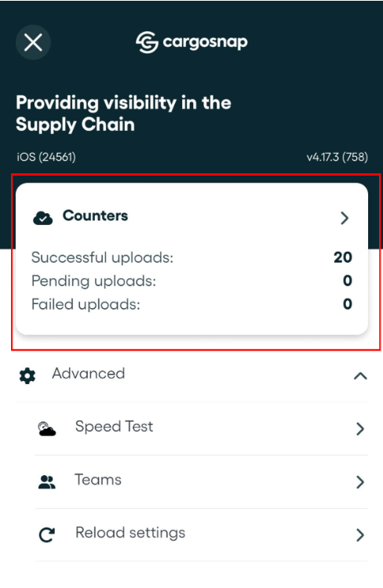
- Click on the "Send diagnostics" button.
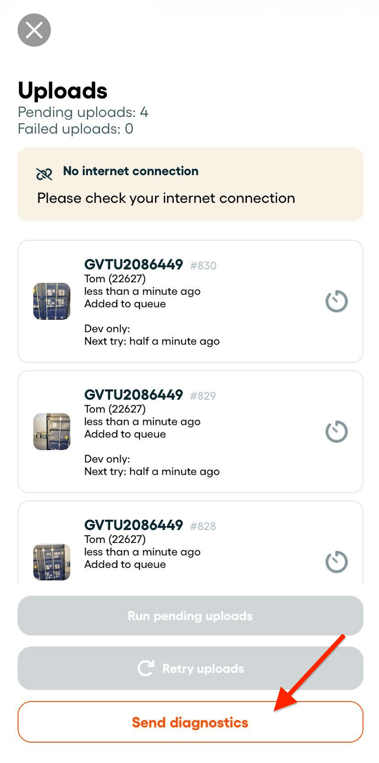
- Wait for the confirmation. And you're done!
☝️ Your diagnostic data contains only technical information—no personal or sensitive data is shared.
Thank you for helping us improve the Cargosnap solution! Your cooperation ensures we can resolve issues faster and make the app even better for you and all users. 🚀