You have the option to update the Cargosnap app manually or automatically. However, why spending time on checking whether there are new updates available or not, when you can let the phone do it automatically for you, right?!
⚠️ Important: To continue using all features and avoid issues, make sure you update the Cargosnap app to the latest version in the Google Play Store (Android) or App Store (Apple). This is needed to keep using our service. Older app version can at some point become outdated, which means that Cargosnap no longer supports this version.
To set up automatic updates for the Cargosnap app on your device:
Android (Google Play Store app)
-
Open the Google Play Store app
-
Tap Menu (3 lines) in the upper left corner and then My apps & games

3. Select the CargoSnap app
4. Tap on the three dots [...} in the upper right corner of the screen
5. Tap Enable auto update

The app will update automatically when updates are available.
iOS (App Store)
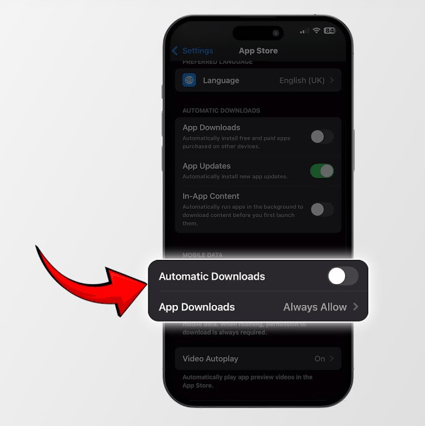
With an Apple device you cannot decide per app whether you want to enable automatic updates or not. You turn it either on for all apps, or off.
Depending on the type of Apple device and the software version installed on it, the way to do it may vary a little, but it comes down to the following:
1. Go to the settings
2. Tap App Store
3. Under the header ‘Automatic downloads’ enable 'App-updates'.
Note: If you don’t want that your 4G data is used to download updates, you can disable ‘Automatic downloads’ under the header ‘Mobile data’