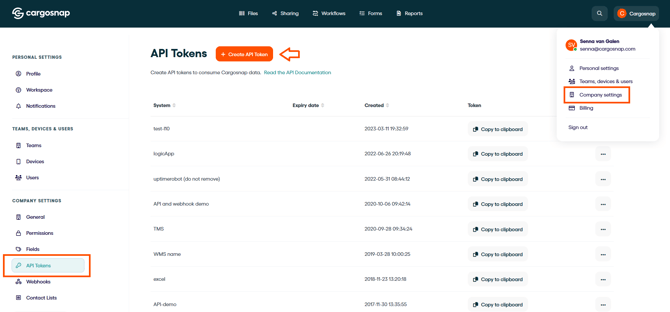
You have multiple options
- Create a PDF Report
- Only download Photos
- Only download Form Results into Excel
-
Export Data Using the Cargosnap API (technical skills required)
Below you'll find helpful links to every option.
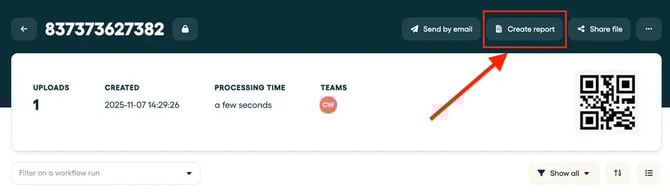
Create a PDF Report
You can generate your report from a file while having a specific file open in your webapp (see image below), or you can generate the report from the file overview (report multiple files also possible).
The benefit of this solutions is that you have ALL the data from your file in one PDF document.
Tip: More information in this article: How to generate a PDF report
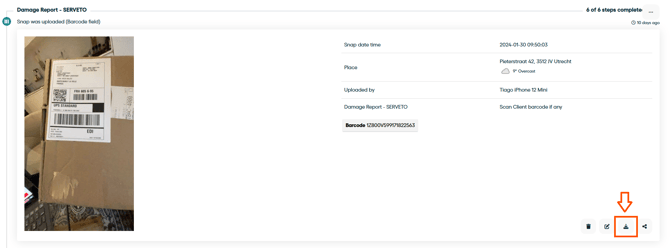
Download Photos from Your Files
You can download a photo one by one (see image below), or download all the photos from one or multiple files at once (from the Files overview page).
Tip: More information in this article: Downloading photos and other uploads
Download Form Results into Excel
To get the most out of your data and operations, we made it possible for you to export your form submits to Excel, giving you a wide range of possibilities to analyze your data.
Tip: More information in this article: How to export your submitted forms to Excel
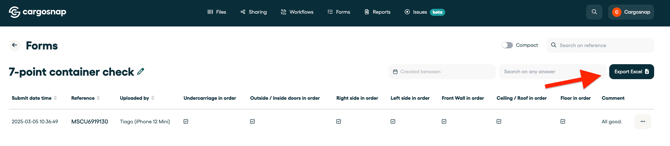
Note: This will not allow you to download your whole file or workflow in to Excel (but only the form). Read below for more information if that is what you are looking for.
Export Data Using the Cargosnap API
Important: This is the only way to download ALL data from a file at the same time to your own environment (workflows, photos, videos, forms and fields).
For teams that want full control or need to integrate Cargosnap data into other systems, the Cargosnap API is the most powerful option.
This powerful feature allows our users to integrate Cargosnap into their TMS, WMS or ERP systems. We even support connecting to Excel, to create your own advanced dashboards.
More information in these articles:
Note: Integrating with our API requires technical knowledge and development experience.